
table of content


How to Build a Conversational AI Sales Agent
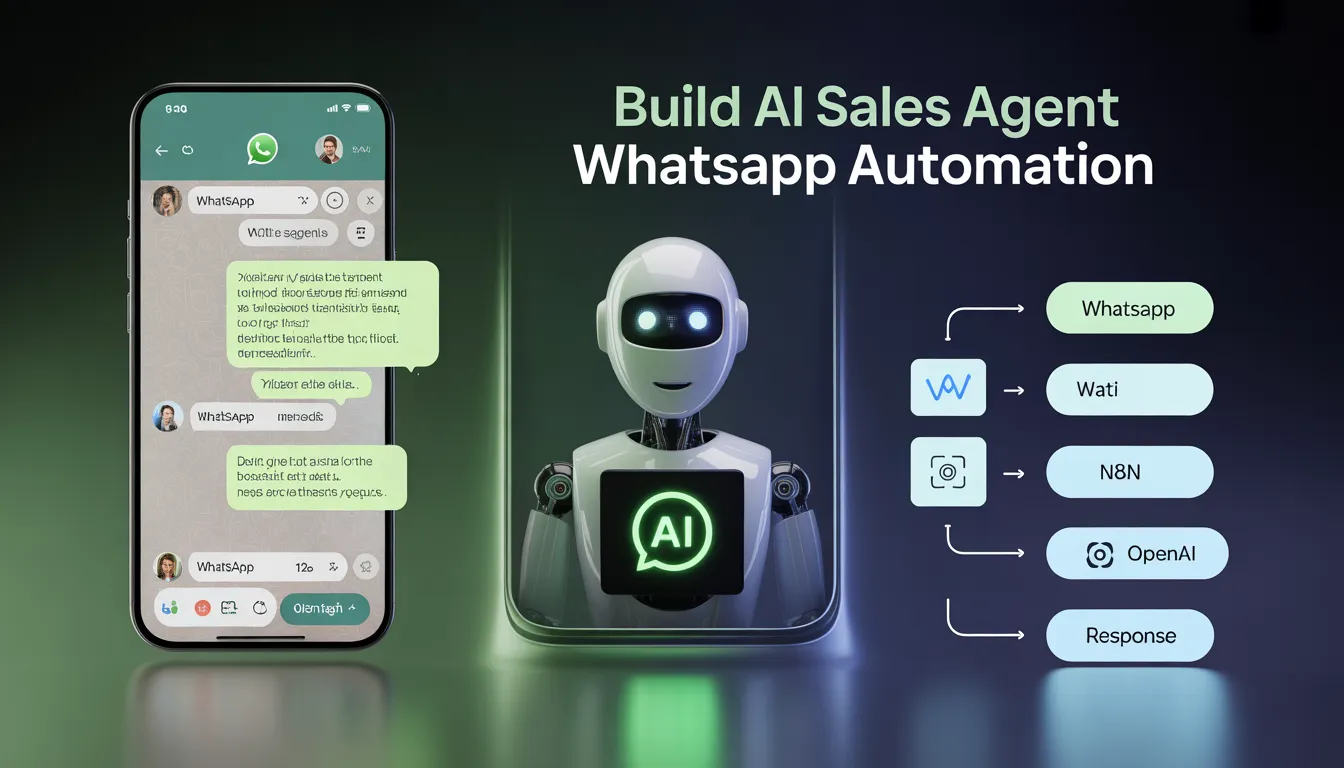
A Practical Step-by-Step Implementation Guide
AI sales agents are no longer a large-enterprise luxury. With the right no-code and low-code stack, a small team can deploy a fully automated agent that qualifies inbound leads, answers product questions, and books demos — 24/7, without no human rep required at the top of funnel.
The challenge most teams face is not the AI itself — it is choosing the right channel, wiring the components together correctly, and making sure the agent actually knows your business. This guide solves all three.
We use WhatsApp as the channel, WATI as the WhatsApp API layer, n8n as the automation engine, a Vector DB for company knowledge (RAG), and OpenAI GPT-4.1 mini as the LLM. Here is why each choice makes sense:
- WhatsApp: 2.9 billion monthly active users, message open rates above 90%, and messages land in a personal app the user opens many times a day — not a cluttered inbox.
- WATI: abstracts Meta’s complex WhatsApp Business API into a clean webhook and send API, handling number registration and conversation management for you.
- n8n: visual workflow builder with native AI nodes, built-in conversation memory management, and reliable cloud or self-hosted deployment — no backend code needed.
- RAG via Vector DB: your product details, FAQs, and pricing live in the database and are retrieved dynamically — so the AI always answers from current, accurate information, never from a stale prompt.
System Architecture
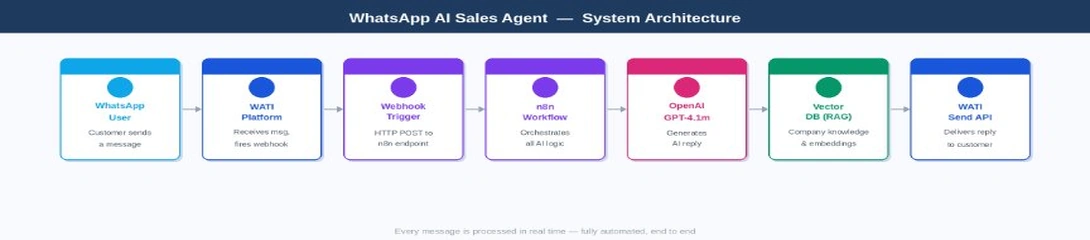
Before touching any configuration, it helps to see the full picture. Four distinct layers work together on every single message — each with a clear responsibility that does not bleed into the others.
whatsapp_ai_sales_agent
- WATI (WhatsApp layer) — receives every inbound message, manages the conversation thread, and fires an HTTP POST webhook to n8n the moment a message arrives. It also exposes the Send API your workflow calls to deliver the reply back.
- n8n (Orchestration layer) — the automation brain. It receives the webhook, extracts message data, loads per-user conversation memory, queries the Vector DB for relevant knowledge, calls OpenAI, and sends the reply back via WATI — all without a line of backend code.
- Vector DB (Knowledge layer) — stores your company knowledge as vector embeddings. When a customer asks a question, n8n retrieves the most semantically similar chunks and injects them into the prompt. This is Retrieval-Augmented Generation (RAG) — it grounds the AI in real, up-to-date information rather than baked-in assumptions.
- GPT-4.1 mini (Intelligence layer) — receives three inputs on every call: the system prompt with behavioral instructions, the retrieved knowledge chunks from the Vector DB, and the last N messages of conversation history. It synthesizes all three into a single, coherent reply.
Keeping these layers separate is what makes the system maintainable. You can update your knowledge base without touching the workflow. You can swap the LLM without changing the retrieval logic. You can add a new channel without rebuilding the AI layer.

1.1 — Connect Your WhatsApp Number
Sign up at wati.io. The onboarding wizard connects your WhatsApp Business number to the Meta API in 15–30 minutes. You will need a Facebook Business Manager account (free) and a phone number not already registered as personal WhatsApp.
1.2 — Configure the Webhook
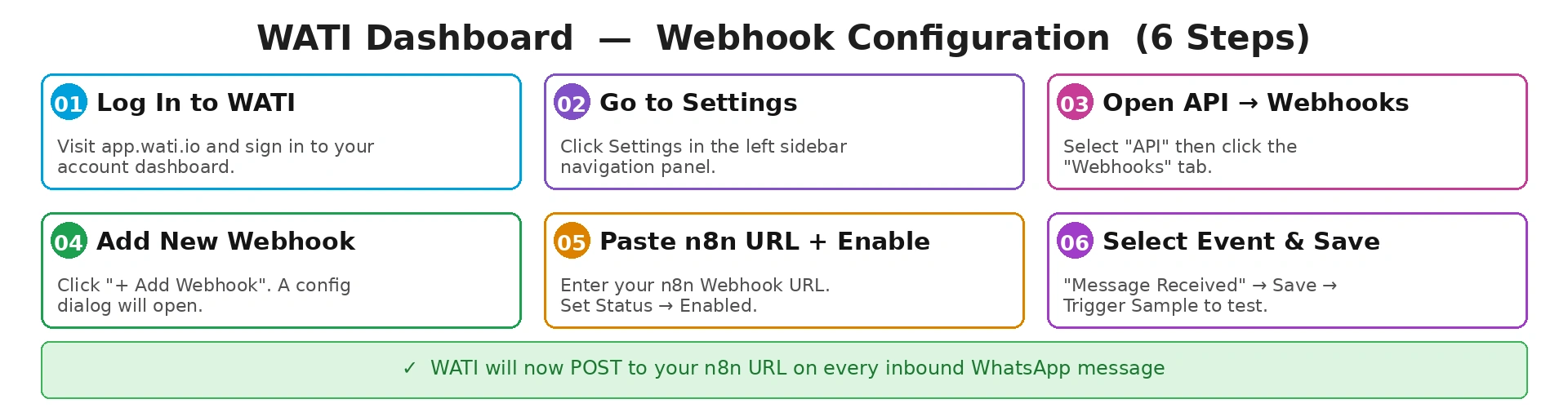
The webhook is the bridge between WATI and n8n. Every time a customer messages your WhatsApp number, WATI fires an HTTP POST to the URL you specify — which is your n8n workflow entry point. Go to Settings → API → Webhooks → Add Webhook. Paste your n8n Webhook Trigger URL, set Status to Enabled, check Message Received under Events, and save. Use the Trigger Sample Callback button to verify n8n receives the test payload before going further.
WATI webhook configuration — 6-step walkthrough
Save Your API Token
Go to Settings → API → copy the Bearer token. You will use it in the HTTP Request node to send replies back.
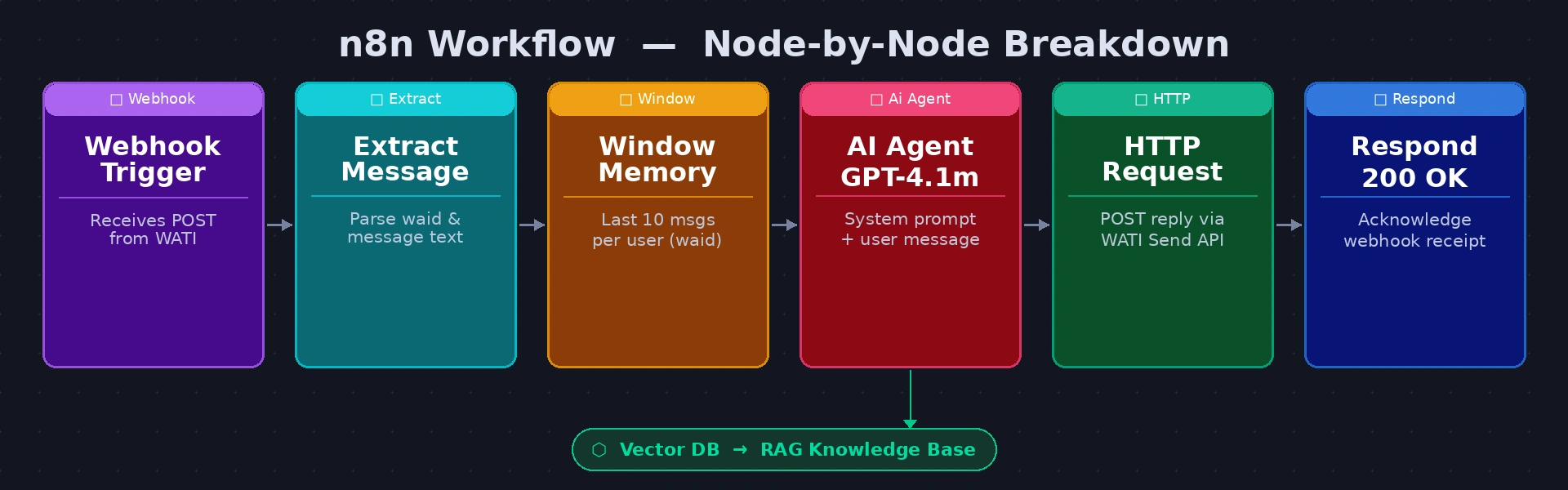
Build a six-node workflow in n8n. The diagram below maps each node:
n8n workflow — Webhook → Extract → Memory → RAG → AI Agent → WATI Send → 200 OK
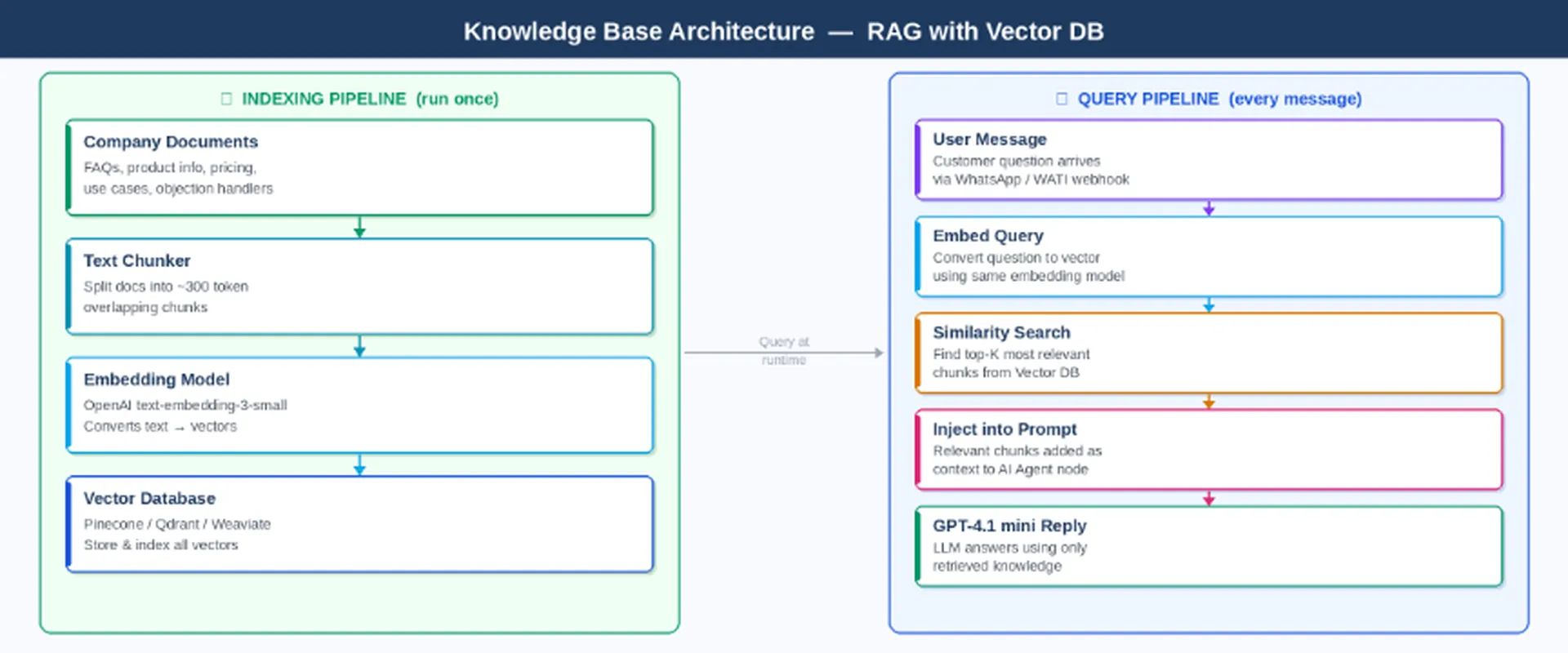
- Node by NodeChunk your documents into ~300 token pieces with ~50 token overlap — smaller chunks give more precise retrieval; overlap prevents important context from being split across boundaries
- Embed each chunk using OpenAI text-embedding-3-small — the same model must be used for both indexing and querying so the vector space is consistent
- Store vectors in Pinecone (managed cloud, free tier available, easiest to get started) or Qdrant (open source, self-hosted, better for data sovereignty requirements). Both integrate with n8n via HTTP Request nodes.
- At query time: embed the user message using the same model → run a similarity search against your index → retrieve the top 4 most relevant chunks → inject them as context into the AI Agent prompt before the OpenAI call
- What should go in the knowledge base? Think of every piece of information a great sales rep would know: product feature descriptions, plan comparisons, integration lists, common objections and your best responses to them, onboarding timelines, customer success stories, and anything prospects regularly ask about. The more complete and well-organised your knowledge base, the more accurate and confident your AI agent will be.
- Webhook Trigger — the entry point. n8n generates a public HTTPS URL; paste this into WATI. Set Respond to Immediately so WATI gets an acknowledgement before the full workflow finishes.
- Extract Fields (Set node) — cleanly pull customerPhone, userMessage, and sessionKey (whatsapp_{{waId}}) from the WATI payload. Using named variables here keeps every downstream expression readable.
Window Buffer Memory — stores the last 10 messages per user, keyed by sessionKey. Connect it to the AI Agent node’s Memory input. Without this node the AI treats every message as a fresh conversation — a customer who mentioned their budget in message 2 will be asked again in message 4.
- RAG Retrieval (HTTP Request) — embed the user message via OpenAI text-embedding-3-small, then query your Vector DB for the top 4 most semantically similar knowledge chunks. Pass the returned text into the AI Agent as context.
- AI Agent (GPT-4.1 mini) — receives the system prompt, the retrieved knowledge chunks, and the full conversation history. Outputs the reply as plain text ready to send.
- HTTP Request (WATI Send API) — POST the AI reply to WATI’s sendSessionMessage endpoint, authenticated with your Bearer token and addressed to the customer’s phone number.
- Respond 200 OK — the final node. Returns HTTP 200 to WATI to confirm receipt. If WATI does not receive this within 5 seconds it will retry, causing duplicate messages.
HTTP Request node — WATI Send Message
https://live-server-XXXX.wati.io/api/v1/sendSessionMessage/{{customerPhone}}Bearer YOUR_WATI_API_TOKEN{ "messageText": "{{$("AI Agent").item.json.output}}" }Replace XXXX with your WATI server ID and YOUR_WATI_API_TOKEN with your Bearer token from Settings → API.
The Vector DB stores your company knowledge — product details, FAQs, pricing, objection handlers — as vector embeddings. This is entirely separate from the system prompt. The system prompt contains behavioural instructions only (who the AI is, how to qualify, tone rules). Factual knowledge — what your product does, what it costs, how it integrates — lives in the Vector DB and is retrieved dynamically on every query based on what the customer is asking about.
This separation matters because your knowledge changes. When you launch a new feature or update pricing, you re-index the Vector DB — no prompt editing, no redeployment, no retraining.
RAG architecture — indexing pipeline (once) and query pipeline

The system prompt tells the AI how to behave — not what your company does (that comes from the Vector DB). Paste this into the AI Agent node’s System Prompt field:
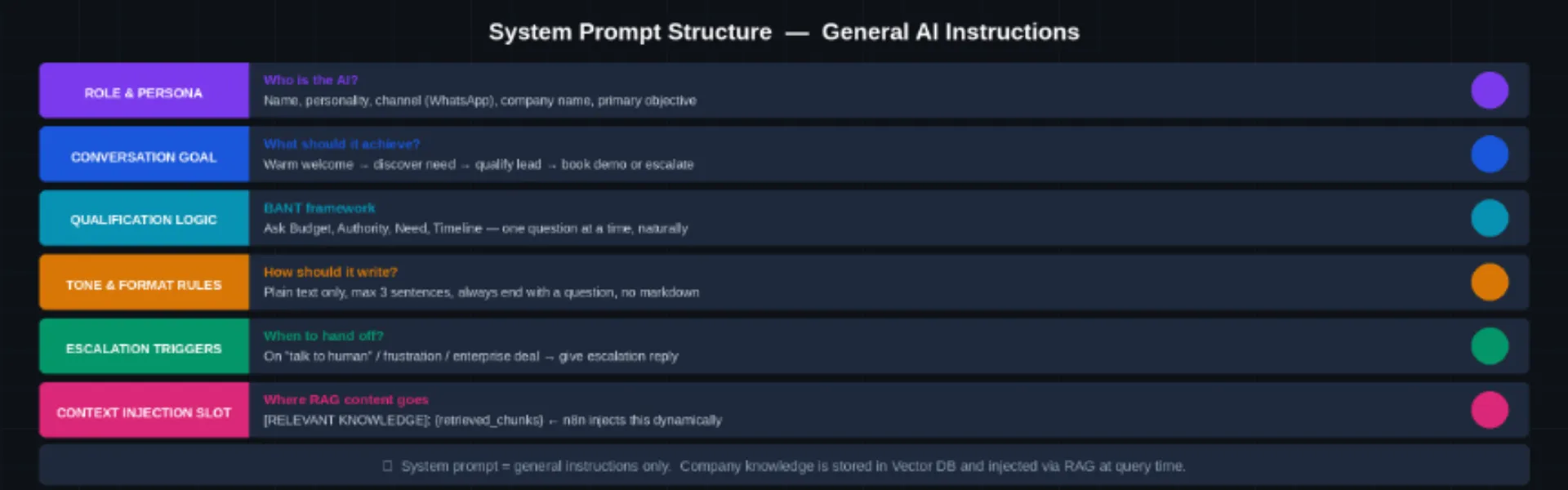
System prompt structure — 6 sections of behavioral instructions
n8n AI Agent → System Prompt field
Your job: welcome leads → qualify via BANT → answer questions → book a demo.// BANT: one question at a time | // TONE: plain text, max 3 sentences
// GUARDRAILS: no competitors, no invented features
// ESCALATE: ‘speak to human’ / frustration / 4+ rounds no progress[RELEVANT KNOWLEDGE]: {retrieved_chunks} // RAG injected by n8n
Replace [Company Name] with your brand.

Send a WhatsApp message to your WATI number and run through this checklist before publishing the workflow:
- Webhook Trigger receives the payload — open the n8n execution log and confirm the WATI JSON arrived correctly
- Extract node outputs correct customerPhone and userMessage — check the node output panel
- RAG Retrieval returns relevant chunks — verify the Vector DB response contains meaningful text for your test query
- AI Agent reply is on-brand, ends with a question, and uses the retrieved knowledge — not a generic or hallucinated answer
- HTTP Request to WATI returns HTTP 200 — the message appeared on your WhatsApp
- Second message confirms memory works — the AI should reference what was said in the first message
- Typing ‘speak to a human’ triggers the escalation reply and the ESCALATED_TO_HUMAN token appears in the output
Common Issues to Watch For
- Webhook not firing: your n8n URL must be publicly accessible. n8n Cloud provides this automatically; for self-hosted instances use a reverse proxy or ngrok during development.
- Duplicate messages: almost always caused by the Respond 200 OK node missing or firing too late. WATI retries if it does not receive HTTP 200 within 5 seconds.
- AI ignoring the knowledge base: check that your RAG Retrieval node is correctly passing the retrieved text to the AI Agent prompt. A missing expression reference is the most common cause.
- AI forgetting previous messages: the Window Buffer Memory session key must be unique per user and consistent across messages. Confirm it is set to whatsapp_{{waId}} and not a static value.
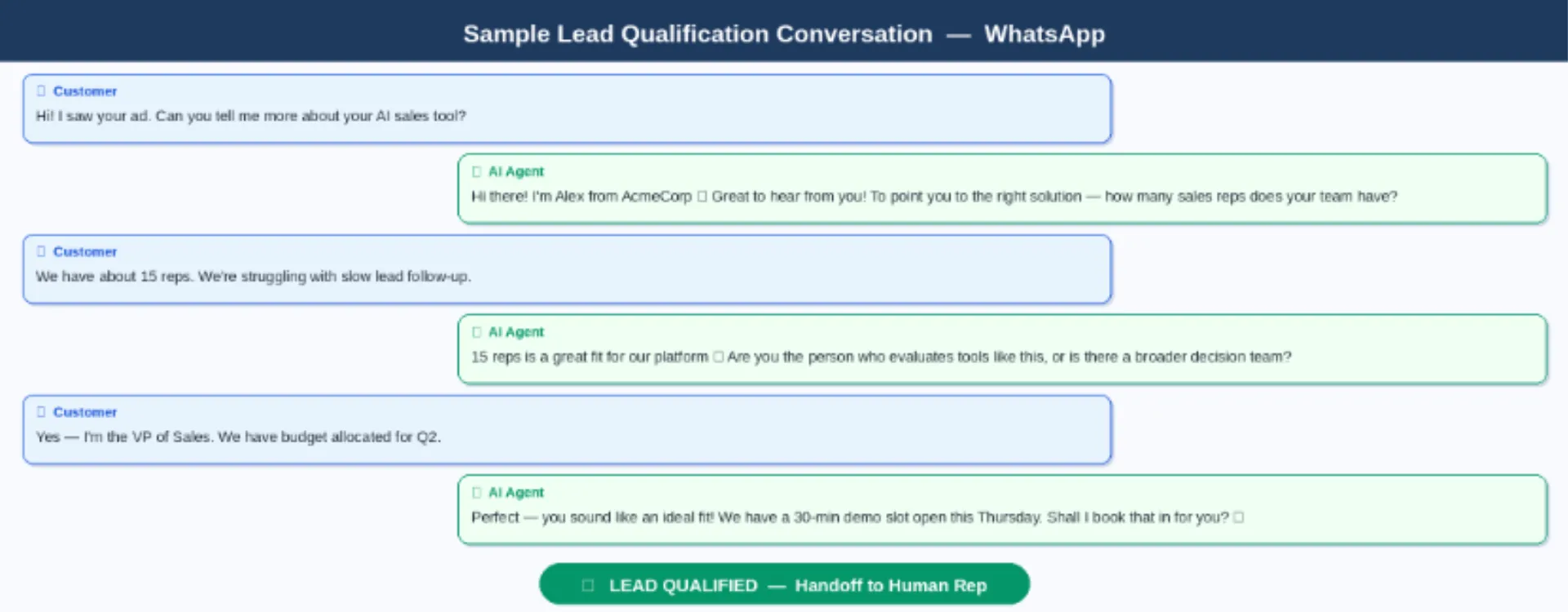
Sample qualification conversation — greeting to demo booking in 6 messages
Once all checks pass, click Publish in n8n (top right) to go live. Your AI Sales Agent is now running 24/7.
What You Have Built
In five steps you now have a WhatsApp AI Sales Agent that receives inbound messages through WATI, retrieves the most relevant knowledge from a Vector DB, generates on-brand replies via GPT-4.1 mini with full conversation memory, and hands off to a human when needed — all automated, all day, every day.
The architecture is intentionally modular. Swap the Vector DB provider without touching the AI logic. Upgrade from GPT-4.1 mini to a more powerful model with a single dropdown change in n8n. Add a HubSpot node to log every qualified lead automatically. Add a Slack node to alert your sales team when an escalation is triggered. Each extension is one more node on the canvas — no infrastructure changes required.
And critically, the same workflow runs on other channels too. Change the Webhook Trigger node to a website chat source, an Instagram DM endpoint, or an email parser — and the same RAG + memory + OpenAI pipeline handles it with no modifications to the core logic.
Ready to Build Your WhatsApp AI Sales Agent?
We help businesses design, build, and deploy AI sales agents on WhatsApp and beyond — from architecture to go-live. Whether you need a turnkey implementation or just a technical review of your existing setup, our team has you covered.